This article picks up where my previous article left off. If you haven’t read it, please check it out here. Now let’s continue. In the previous article, we discussed how to manage tmux session, creating and attaching to sessions. Now, let’s discuss some of the advanced topics. First of all, let’s discuss key-bindings. For example, the default keys to spawn new panes, or detach from the current session are not intuitive to me. In order to change those defaults, you have to create a file, in your home directory, called .tmux.conf. Please pay attention to the period “.” before the filename, in UNIX this simply means that the file is hidden.
For example, I much prefer the prefix instead of being CTRL-B, to be CTRL-A. Much easier to locate. However, you can set the binding to whatever you would like. Let’s talk how to change it. After you have a shell session open, edit or create the file .tmux.conf, and add the following values:
# Set the prefix key
set -g prefix C-a# Bind the new prefix key to send the prefix command
bind C-a send-prefix
Now in order for the new config to take place, you will have to reload the config, or kill the server. From the prompt $, type the following command:
tmux kill-server
After that, restart a session and try to disconnect with CTRL-A+D.
Great, now that you have changed the default key binding, let’s continue editing the file .tmux.conf to add a few more settings:
# Set the prefix key
set -g prefix C-a# Bind the new prefix key to send the prefix command
bind C-a send-prefix# Bind r to reload ~/.tmux.conf
bind r {
source-file ~/.tmux.conf
display-message “Configuration reloaded!”
}# Act like VI
setw -g mode-keys vi# switch panes using Alt-arrow without prefix
bind -n M-Left select-pane -L
bind -n M-Right select-pane -R
bind -n M-Up select-pane -U
bind -n M-Down select-pane -D# set higher escape time
set -s escape-time 200# True color settings
set -g default-terminal “$TERM”
set -ag terminal-overrides “,$TERM:Tc”# split panes using | and –
bind | split-window -h
bind – split-window -v
unbind ‘”‘
unbind %set -g base-index 1
# Enable mouse control (clickable windows, panes, resizable panes)
set -g mouse on
Now, there is a lot in the above settings, let’s discuss them. If you read from the beginning, we override the default key binding, assigning CTRL-A, plus we bind the r so that the config can be reloaded without restarting tmux server, since I like VI, I assign the default behavior to be like VI, then I assign the Arrow keys to move between panes (will show you later in the post), some terminal color, plus, very important, the keys to split panes, which in my opinion, is the more useful thing in tmux. I assign pipe (|) to split vertically, and minus “-” to split horizontally, makes more sense in my mind, plus enable mouse control, so you can use the mouse for some actions. Feel free to make the changes you prefer to the config, save the file, kill the tmux server with the command above. Start a new tmux session, attempt to split up horizontally with the following key sequence: CTRL-A+-. You should see a window like the following:

Now attempt to split up vertically with the following key sequence: CTRL-A+|. The | is the pipe symbol. You should get a window similar to the following:
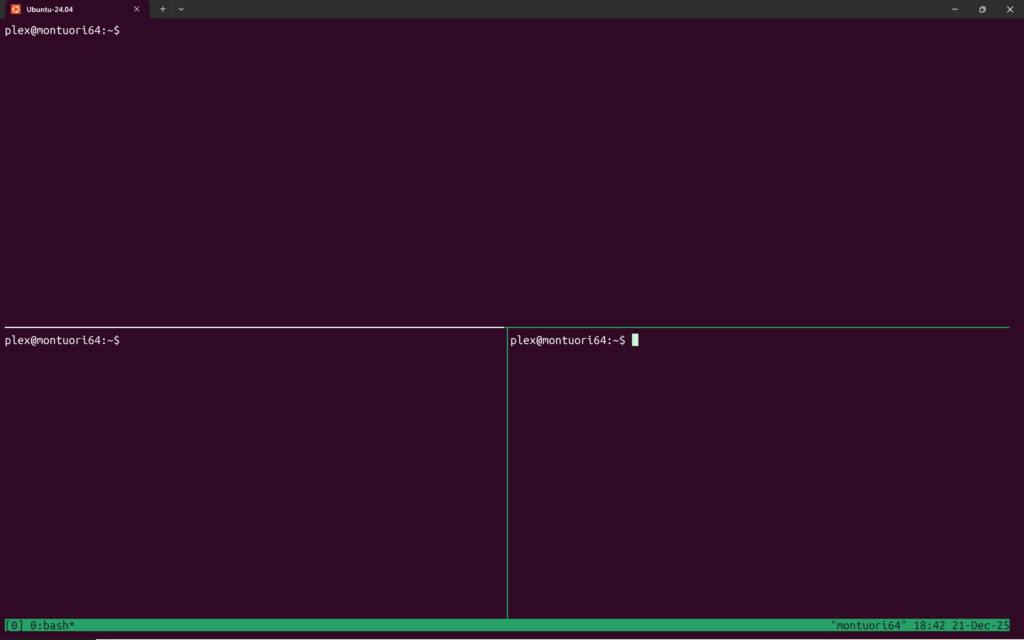
At this point, you should start seeing the power of tmux and what it can do for you. That’s all, tmux help you in being more productive.
There is a whole world of tmux which opens the usefulness to the max, plugins, plugins are beyond the scope of this article as they represent exactly that. But, at the very least, I can point you to what I think it’s the best site describing the most popular plugins together with a plugin manager which simplifies the setup, and who knows, I might write an article dedicated to tmux plugins, it depends on how this article performs. The plugin site can be found:
https://github.com/tmux-plugins
I hop you have a better understand of the tmux basics and how you can use it to better aide you. I again thank you for stopping by and reading this article.
Happy reading and type.